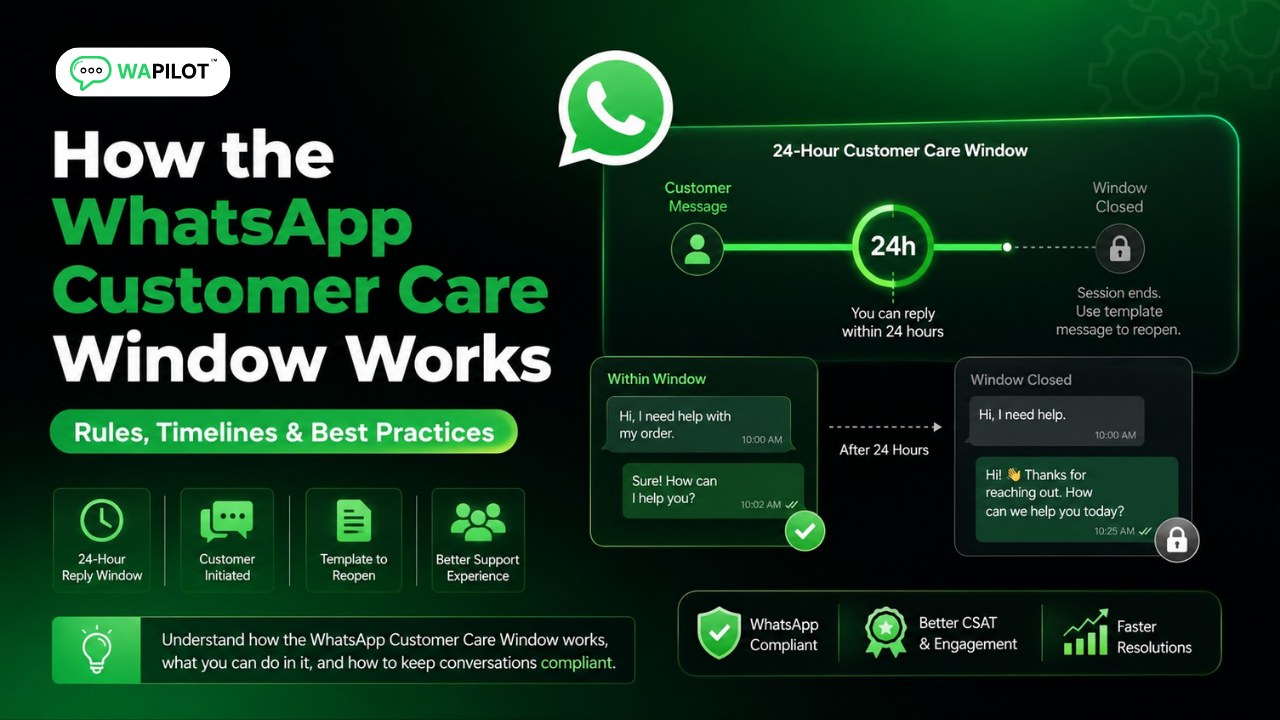
Most Cloud API teams only notice the WhatsApp customer care window after a free-form reply fails with a policy error. The clock is not a WAPilot setting. Meta starts it when the customer messages you, and it decides whether you may send session messages or must switch to template messages.
Support queues make this painful. An agent drafts a helpful follow-up an hour after the window closes, the send is rejected, and the ticket sits until someone maps the error to a template. Cheap blast tools ignore the window entirely and then blame the API.
In this guide, you'll discover how the window is measured, which message types it allows, and seven operating rules that keep inbox and campaigns aligned — without unofficial gateways. As a WAPilot team that ships Cloud API inbox and templates every week, we see the same miss: treating every outbound as a chat reply.
The 24-hour service window is Meta's period after a user message when your business can send free-form session messages. Outside it, you need an approved template. It protects people from unexpected chats and it is a weekly operations metric, not a one-time setup checkbox.
What is a WhatsApp customer care window?
Sources: Meta’s Cloud API send-messages guide and messaging limits docs. We map those rules to WAPilot inbox and campaign ops, not unofficial gateways.
When a customer writes to your Cloud API number, Meta opens a service window. Inside it, agents can send regular text, media, and interactive replies. When it expires, those session messages stop until the user writes again or you send a valid template.
This is separate from quality rating and from green-tick branding. You can have a verified profile and still fail sends if you ignore the clock. Pair window discipline with the WhatsApp quality rating habits so blocks do not stack on top of expired sessions.
Count the clock from the last inbound user message, not from your last outbound. A bot menu click, a location pin, and a typed “hi” all count as customer messages. A campaign you fired last night does not. If two brands share a number, the window is still one clock on that thread, which is why mixed support-and-promo inboxes go wrong.
How do session messages differ from templates?
Session messages are the conversational replies inside the window. Template messages are pre-approved outbound. Utility and authentication templates can still deliver operational alerts after the window, but they are not a loophole for promos. Category mismatch is how numbers get restricted.
Think of session messages as the live ticket, and templates as the scheduled letter. Live tickets can include ad-hoc photos, order notes, and buttons. Letters must match the copy Meta approved. If you paste a festival offer into a utility body, you are not being clever — you are training the quality system to distrust the number.
If you are still choosing a stack, use the Cloud API launch checklist before you scale volume. Limits and windows reward clean operations, not the cheapest unofficial connector.
In Meta Business Manager, failed sends after hours usually show a policy or window error, not a random timeout. Train agents to read that payload instead of retrying the same chat text. Retries burn the same rule and make the contact look noisy.
Seven practices that keep the window useful
These are the habits we use on production WAPilot workspaces. They need list discipline and inbox staffing, not a custom kernel of code. Write them into your playbook the same week you go live, before the first late-night spike.
- Show the clock in the inbox. Agents should see remaining time before they type a long reply. A countdown next to the composer beats a wiki page nobody opens.
- Reply while the user is still in-thread. A same-hour answer beats a perfect note tomorrow that needs a template. Even a short “checking stock, reply in 20 minutes” keeps the conversation open.
- Map after-hours to templates. Order updates and OTPs belong in approved template messages, not pasted chat text. Build that map with operations, not only with marketing copy.
- Do not reopen with marketing. A closed window is not permission to send a festival blast. If the user asked about a delayed parcel, do not attach a coupon pack.
- Keep opt-in on the contact. The window is not consent. You still need customer opt-in for campaigns, and you still need a stop path that actually stops.
- Watch failures in Meta Business Manager. Policy errors after hours usually mean “use a template,” not “the API is down.” Escalate the first unexplained spike, not the fiftieth retry.
- Staff a human fallback. Bots that loop menus until the window dies drive reports. Hand off to a person while time remains, then use a template only for the overnight gap.
Rule sources: Meta’s customer service window and session messages, template messages, and messaging limits. Inbox clocks and staffing are WAPilot operations on top of those rules, not extra Meta products.
If noisy campaigns already burned people, start with the WhatsApp Cloud API mistakes list before you add more automation. New flows on a tired number make the same window errors look like product bugs.
Which mistakes close the window fastest?
Attributed example, from a WAPilot onboarding workspace (D2C apparel, shared inbox, 2026): an agent answered a size question, queued product photos for the morning, then the free-form send failed after the service window closed. The shopper had already checked out elsewhere. The fix was a same-day “photos in 20 minutes” session reply, plus a catalog utility template for overnight. Recovery was operational — train the inbox, not buy a new number.
Another failure is sharing one Cloud API number across brands. Recipients who thought they were talking to support then receive a promo after the window. That mix trains people to block you. Keep support and marketing rules explicit, and use approved message templates only when they match the original promise.
A third miss is treating webhooks as optional. If delivery receipts and inbound events land late, agents work from a stale thread and type into a closed window. Keep webhook retries boring and visible. Quiet failure here looks like “WhatsApp is slow” to the floor, when the real issue is your event pipeline.
Do not rotate numbers to dodge a closed window. That move often collides with quality rating, display-name reviews, and customer trust. Fix staffing and templates on the number you already registered.
How should teams staff overnight coverage?
You do not need 24/7 agents in every timezone. You need a named owner for the last two hours of each window, a template pack for the hours nobody is online, and a morning queue that does not start with failed session messages. Overnight OTPs and shipping alerts should already be templates. Human follow-up can wait until the user writes again.
If your catalog is global, split queues by language and quiet hours instead of one mega-inbox. A Portuguese night shift answering English tickets slowly will still miss the clock. Route by last inbound language, then by remaining time. That is operations, not a new Cloud API product.
Measure two numbers weekly: share of tickets closed inside the window, and share of after-hours sends that used the correct template category. If the first drops, staff or bot-handoff is late. If the second drops, marketing is stuffing utility templates again.
How we know: WAPilot ships official Cloud API inbox, campaigns, and templates. This guide is written from failed-send queues we debug with customers, mapped to Meta’s public Cloud API docs — not from unofficial gateways or invented lab tests.
FAQs
How long does recovery take after you stop bad traffic?
Plan on days for quality, and minutes for the next user message to reopen a window. Stopping noisy templates does not invent a new 24-hour clock. Wait for the customer to write, or send a relevant approved template.
Does a template reopen the customer care window?
No. Only an inbound user message starts the service window. A template can deliver information; it does not reset session messaging on its own. Treat templates as letters, not as a key to unlock chat.
Does a bot-to-agent handoff reset the window on a shared number?
No. Meta counts one service window per customer-to-business thread, not per agent or bot. Handing a chat to a human does not add 24 hours. Two brands on one Cloud API number also share that clock, so a promo from brand B can land in a support thread from brand A after hours. Split numbers or lock templates to the original intent.
Can we send session messages from a bot after 24 hours?
No. Bots follow the same Cloud API rules as humans. After the window, use a template or wait for the user. Routing to inbox does not change Meta's clock, and looping a menu until morning usually earns a block instead of a sale.
Keep the window visible next to campaign volume. Recap: reply in-thread, use template messages outside the clock, and watch messaging limits before you scale. When you are ready to run that loop on official Cloud API, start a free trial on WAPilot and keep delivery under your control.